

Choose a scope
Select Insights in the sidebar. It opens on Suggested priorities. Use the teams filter, which reads All teams or All my teams until you pick, to choose which of your teams to read. Owners, administrators, and coaches can read every team. They also see Company and Teams views on Suggested priorities and SWOT. An administrator can give the same access to your designated leadership team: choose the Leadership team in Configuration, then turn on Company Insights access. Other members read the teams they belong to. Check the scope before interpreting a result. A team view and a company view answer different questions.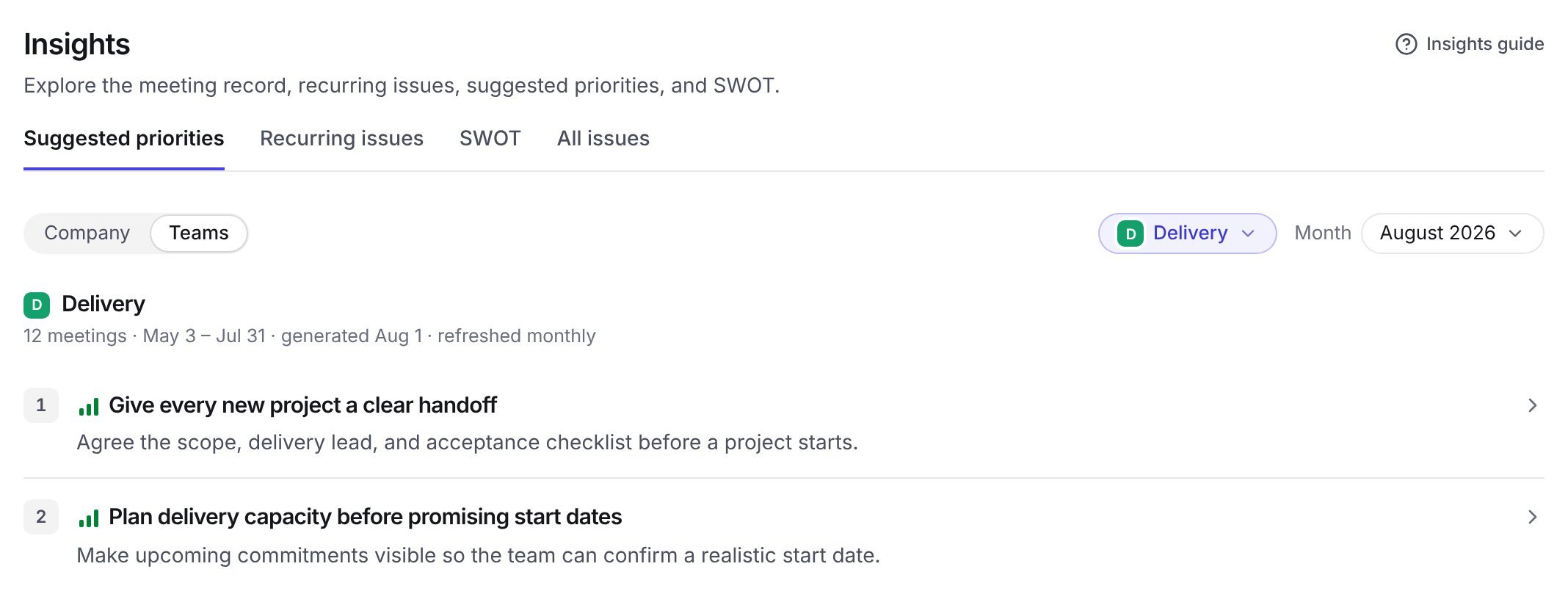
Example data: the Teams view, the Delivery team, and the August 2026 assessment are selected.
What each section shows
Insights has these tabs:
Notable news and updates from each meeting are on their own page, Headlines, in the sidebar.
Headlines and All issues fill in as TenTenor analyzes each meeting. Suggested priorities, recurring issues, and SWOT come from a monthly assessment.
What Insights is based on
When TenTenor analyzes a meeting, it records the meeting’s headlines and issues. These are the items you see in the meeting report. The monthly assessment reads those items. It does not reread full transcripts.- Meetings: Analyzed weekly team meetings and quarterly planning meetings contribute. Daily huddle formats do not. Recorded meetings, uploaded audio, and imported transcripts all count once analyzed.
- Time window: The assessment covers the 90 days up to the day it runs. Quarterly planning meetings count for 210 days, so the assessment knows what your team agreed at its last planning session.
- Minimum: A team needs three analyzed meetings in the window before it receives suggested priorities.
- Items used: Recurring issues come from issues. Suggested priorities and SWOT draw on headlines and issues. They do not use to-dos.
How recurring issues are identified
TenTenor links issues from different meetings when they describe the same underlying problem, such as the same cause or a decision the team keeps postponing. Two different problems in the same category stay separate. A recurring issue appears once the same problem has come up in at least two meetings. Open a recurring issue to see:- A summary of the problem.
- Why it keeps coming back and What would close it.
- Evidence from each meeting where the issue came up, with quotes and outcomes.
How suggested priorities are chosen
Each suggested priority is an outcome your team could finish within a quarter. The title names the outcome. Done when describes how you would verify it at the end of the quarter. TenTenor favors, in this order:- Outcomes that would resolve several recorded issues at once.
- Recurring, high-impact issues that remain unresolved.
- Headlines that change your team’s situation.
Company and team priorities
Team priorities cover what one team can finish on its own. Company priorities cover what needs a shared decision, resources, coordination between teams, or action on a material company risk. Open a company priority to see Who moves it, with suggested owning teams and the team priorities that contribute to it. Decision or support needed names what the priority is waiting on.Use suggested priorities
TenTenor does not set priorities for you. Your team decides which suggestions to adopt.- Bring suggested priorities to your quarterly planning session. Choose the outcomes you will commit to, then agree an owner and a due date for each.
- Check the evidence before committing, especially for priorities marked Thin evidence.
- In weekly meetings, use Recurring issues to choose problems to solve for good. What would close it gives a starting point for the discussion.
- Compare months with the Month selector to see which priorities continue and which are new.
Read the evidence
Open the evidence attached to an insight to understand where it came from. Check the meeting date and the words used in the original discussion. Two similar statements may refer to different situations. Review the underlying context before treating them as one recurring problem. Select Open full meeting report on an evidence page to read the whole meeting. The link appears when you have access to that team’s reports.Understand the timing
TenTenor runs the monthly assessment on your organization’s generation day, in your reporting time zone. Results are ready within a few hours. The assessment carries the name of the month it runs in and covers the 90 days up to that day. An administrator sets the Generation day in Configuration under Monthly priorities and recurring issues, and the time zone under Reporting calendar. A newly analyzed meeting appears in Headlines and All issues right away. It reaches suggested priorities, recurring issues, and SWOT at the next monthly run. A new team receives its first suggested priorities shortly after its third analyzed meeting, without waiting for the generation day. Company assessments can refer to a saved version of a team’s priorities. If you see a difference, compare the dates and versions before assuming one is incorrect.Monthly Insights email
When a new monthly assessment is ready, TenTenor emails a summary with links to the new suggested priorities and recurring issues.- Owners, administrators, and coaches receive the company assessment and every team. Members of the designated leadership team receive the same when that access is on.
- Other members receive the teams they belong to.
How teams contribute
Administrators can configure a team’s Memory contribution:- Independent team contributes its own priorities and organization context.
- Supports another team contributes context to the receiving team’s priorities and recurring issues.
- Organization context only contributes to organization context without a separate team priorities list.
Members of a receiving team can read the supporting team’s shared memory and evidence in Insights. That sharing does not grant access to the supporting team’s full reports, transcripts, or recordings.